Traits
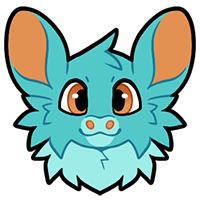
Tundra Fur (Tundra)
Tundra Xeros can have extra fluffy fur, called Tundra Fur. Often shown as a super fluffy neck and chest area like a mane, but can also be extra fluffy on the undersides of the limbs, the tail, sides of the face, etc.

Hairless (Seasonal)
Hairless Xeros are very rare. Their fur is very useful for regulating their temperature and protecting them from their environment, so its not common at all to see them with fur missing. The hairless trait can manifest in different ways; from just a hairless tail or belly, to only hair on the top of the head, to even completely bald! The color of skin where their fur is missing must be the same as the other visible flesh on their ears, tongue, and paw pads, but it can vary in different shades.

Fur Pads (Seasonal)
The fur pads trait gives a Xero extra fluffy feet that covers their paw pads, like a rabbit or fennec fox! This adaptation can help protect their paws against extremely hot or cold conditions.

Savannah Mane (Savannah)
A long fluffy mane that can cover part or all of a Xero’s back, or even go onto their tail! The primary purpose of the mane is to protect the Xero’s back from UV damage from the sun, since there is not a lot of shade on the open grasslands this trait evolved on. Plus, it also serves as a fashion statement.

Morph Dyed (Glitched)
Applying a Morph Dye Pot to fur and skin prior to entering the Glitch device allows a Xero to permanently change how their coats color appears, beyond the typical Redesign Rules.
‼️ If your Xero is reverted to its first Masterlist upload, another Morph Dye Pot item will need to be used to reapply its effects.‼️
How To Use This Trait
 Trait limitations
- Morph Dye Pot is used to change the patterns of a Xeros's existing markings beyond what’s allowed in our Redesign Page. The Xero's color pallet cannot change with the Morph Dye Pot. In the instance of conflicting colors, ONE additional color may be added or ONE existing color may be removed to ensure design consistency!
- You may use EITHER the Morph Dye Pot or Chroma Dye Pot per redesign. They cannot be combined together on a Xero.
- Once a Xero is dyed, it cannot be redyed without reverting to its original design on the Masterlist.
- Traits present on a Xero's origional Masterlist entry must remain majoritively unchanged when applying the Morph Dye Pot.
- The redesigned Xero CANNOT look like pre-existing Xeros.
- This change functions as a redesign and becomes the Xero’s ACTIVE Masterlist entry. Only the active Masterlist entry will be permitted to use when submitting official Prompts and activities!

The above is an example of how the Morph Dye Pot can be applied to a Xero- in this instance Ziggy! All colors and traits remain the same, but the markings can shift wildly!
This trait can be added to your Xero by giving them a Morph Dye Pot.
Click the magnifying glass above for examples of this trait! 🔍

Chroma Dyed (Glitched)
Applying a Chroma Dye Pot to fur and skin prior to entering the Glitch device allows a Xero to permanently change how their coats color appears, beyond the typical Redesign Rules.
‼️ If your Xero is reverted to its first Masterlist upload, another Chroma Dye Pot item will need to be used to reapply its effects.‼️
How To Use This Trait
Trait limitations
- Chroma Dye Pot is used to change the colors of a Xeros's existing markings beyond what’s allowed in our Redesign Page. Markings cannot change with the Choma Dye Pot. In the instance of conflicting markings, ONE trivial marking may be removed to ensure design consistency!
- You may use EITHER the Chroma Dye Pot or Morph Dye Pot per redesign. They cannot be combined together on a Xero.
- Once a Xero is dyed, it cannot be redyed without reverting to its original design on the Masterlist.
- Traits present on a Xero's origional Masterlist entry must remain majoritively unchanged when applying the Chroma Dye Pot.
- The redesigned Xero CANNOT look like pre-existing Xeros.
- This change functions as a redesign and becomes the Xero’s ACTIVE Masterlist entry. Only the active Masterlist entry will be permitted to use when submitting official Prompts and activities!

The above is an example of how the Chroma Dye Pot can be applied to a Xero- in this instance Ziggy! All markings and traits remain the same, but the colors can shift wildly!
This trait can be added to your Xero by giving them a Chroma Dye Pot.
Click the magnifying glass above for examples of this trait! 🔍